Monday, October 10, 2011

Install Ubuntu 11.04 on Lenovo C205 All-in-one PC

Recently I bought myself a low-cost Lenovo C205 All-In-One for home use, and quickly came to hate the Windows 7 Starter version it came installed with. So, I tried to run Ubuntu 11.04 (Natty Narwhal) on it, only to find that graphics support would not work out of the box.

So, looking around, I cobbled together these instructions; I'm posting them hoping it might help out others in a similar situation:

1. Start out by grabbing the Ubuntu Alternate Install ISO disc and burning it to a CD. This provides a text-based install that will get us a running Ubuntu terminal from where we'll be able to install the graphics drivers to get the full-blown Ubuntu.

2. Install Ubuntu!

2. After you finish installation, you should now boot into text mode. If you don't force text mode, you will just get a black screen, or a garbled GUI.

You force text mode by: using the Grub menu (purple screen) that shows up when restarting your computer. Select Ubuntu from the menu, then hit the e key and add the word text to the end of that line. Once you do that, hit b to continue on to booting.

After booting completes, hit CTRL-ALT-F1, and log in using the username/password you gave during installation at the prompt.

3. Once you're logged in, fetch and install the proper drivers. I used some of the steps outlined in http://forum.xbmc.org/showthread.php?t=106898 Of course you need a working Internet connection to do this.

Note: Last I checked, the ATI Catalyst driver version was 11.7; some of the following won't work if for some reason the driver version has changed.

Run the following commands one by one.
 
sudo apt-get install -y dkms

cd ~; mkdir catalyst11.7; cd catalyst11.7

wget http://www2.ati.com/drivers/linux/ati-driver-installer-11-8-x86.x86_64.run

chmod +x ati-driver-installer-11-8-x86.x86_64.run

sudo sh ./ati-driver-installer-11-8-x86.x86_64.run --extract ati

cd ati

sudo ./ati-installer.sh 8.881 --buildpkg Ubuntu/natty

cd ..

rm -rf ati

sudo dpkg -i fglrx*.deb

sudo aticonfig --initial -f

sudo aticonfig --input=/etc/X11/xorg.conf --tls=1

After running all of the above commands, you have to reboot:

sudo reboot

Now, let the normal boot sequence start and lo an behold, graphics should now work! Yay!

Friday, September 30, 2011

Experimenting with Kinect for education

We've had a Kinect at the Center for the last few weeks. Sadly, we've not been able to spend that much time with it (and is also not on the top of our priorities), but clearly see there are a lot of possibilities.

To me it seems that, in regards to educational purposes, Kinect will help out by engaging learners; forcing them to move just fires up some of those lazy neurons. By itself, this clearly brings an advantage to whatever app you hook it up to.

Imagine playing a math game with mouse clicks, vs. a Kinect-based game where you wave your arms, turn, crouch or jump to acheive goals. I think the latter might make reaching learning goals easier than the former. Of course, research has to be done =)

That aside, just getting the thing to work hasn't been that hard; basically there are several libraries out there that form the basic drivers on which developers can build on. The libraries seem pretty stable and work fine, but there aren't too many downloadable examples (or we're having a hard time finding them).

In future posts I plan to offer some updates documenting some of the stuff we've found. Some topics might be:
  • low-level SDKs or libraries that talk to Kinect
  • development stacks (from drivers to graphics/game framework) for Windows, Mac and/or Linux
  • ideas of real-world educational applications to build with Kinect (or showcasing existing ones)
For now, we've covered some of the basics:
  • Windows: installed the available OpenNI + NITE + SensorKinect binaries. On top of that, FAAST. This allowed us to emulate key presses through Kinect gestures. Thus, we can now have Kinect Tetris, Kinect Doom, etc. Interactive but not that innovative =)
  • Linux (Ubuntu): this was a tad harder. Some bits are available as downloadable binaries (and only then for Ubuntu 10.10), but most other require getting a bunch of libraries and then compiling. Not horrific, but not quite straightforward either.  End result: we're a step behind the work on Windows: just the skeleton tracking on some of the sample demos, no app control yet.
  • Mac: coming soon.
Why are we doing this?
I have to say this whole experience is interesting: I have almost zero experience developing native applications on any platform, which is our target audience exactly--students and teachers who want to build things, but need a kickstart (which we would like to provide).

Our goal isn't clearly defined at the moment, but we are confident this (like other technologies we work with) is a tool that will improve learning, or enable different ways of doing so. That might be an obvious statement to make, but part of our job is to actually test and prove it to be so.

And, I'd be lying if I didn't say I'm also having fun. Gladly, that's a part of my job too.

Wednesday, September 28, 2011

New OAI-PMH harvesting application: OAIConnect


Some months ago, I was hired to work on a web application that would grab metadata records from different document repositories (mainly in universities) and join them into a central catalog. This application should:
  • work with OAI-PMH repositories such as DSpace
  • provide faceted search of the harvested items
  • use open source products
  • be itself released as an open source product
The application was to be installed, and used by actual people in a project to harvest educational materials for a research project. That site is available at http://www.educonector.info/

Last week I released the code to the public as OAIConnect. The application can be installed by anyone who can meet some basic requirements (Apache, MySQL and PHP). The application is built on top of Drupal and a host of freely available modules (plus some custom glue), so you can basically extend, restyle and reconfigure it to your liking.

Screenshots
Installer:

Starting page:


Sample record:

Friday, November 12, 2010

Millennium Integration module for Drupal 2.0 screenshots

Here are some screenshots from the 2.0 version of the Drupal Millennium Integration module in action.

These records were imported from a live library catalog. This example is using the Fusion theme.
Teasers for nodes with imported records.
A full node view. The Table of Contents section below is provided by the optional (included) Millennium Enrichment module which brings in data from the Library of Congress at import time. All the information would be in Drupal's full text index and thus is searchable.
This node shows an embedded Google Book Search reader. It only shows when the item actually has a preview or full view in Google Book Search.
This is a wall of books from the included Views integration. This example uses the Garland theme.

You can easily do manual or automatic batch imports in a variety of ways; this screenshot shows an example.


Here are some of the configuration/settings screens.
General settings and sources. The module can handle several OPACs simultaneously.


Read more over at the Millennium Integration module project page.

Wednesday, September 15, 2010

Remove empty space above tabs in Firefox 4 beta 6 title bar

These instructions for Firefox 4 beta 5/6.
  1. Find your userChrome folder inside your Profile folder: to find your profile folder, see: http://kb.mozillazine.org/Profile_folder

  2. Find the "chrome" folder and open it.

  3. Edit userChrome.css

  4. Add this snippet to that file:
    @namespace url(http://www.mozilla.org/keymaster/gatekeeper/there.is.only.xul);
    
    /* Note: assumes app button is visible (menu bar disabled) */
    
    /* Move tabs up to titlebar */
    #main-window[sizemode="maximized"] #navigator-toolbox[tabsontop="true"] #TabsToolbar {
        padding-left: 112px !important;
        padding-right: 112px !important;
    }
    #main-window[sizemode="normal"] #navigator-toolbox[tabsontop="true"] #TabsToolbar {
        padding-left: 112px !important;
        padding-right: 109px !important;
    }
    
    /* Move the menubar above the tabs so it moves the tab bar down when activated */
    #main-window[sizemode="maximized"] #navigator-toolbox[tabsontop="true"] #toolbar-menubar {
        margin: -19px 0px 3px 112px !important;
    }
    #main-window[sizemode="normal"] #navigator-toolbox[tabsontop="true"] #toolbar-menubar {
        margin: -24px 0px 3px 112px !important;
    }
    
    /* Curved corners when tabs-on-top and normal window */
    #main-window[sizemode="normal"] #navigator-toolbox[tabsontop="true"] #nav-bar {
        -moz-border-radius-topleft: 5px !important;
        -moz-border-radius-topright: 5px !important;
    }
    
    (taken from http://userstyles.org/styles/36432)

  5. Restart Firefox.

Friday, September 10, 2010

Usage of library Drupal modules

Edit: Failed to include (my own) HILCC module. How embarassing.

Out of curiosity, I did a quick sampling of usage stats (according to Drupal.org) of different library-related Drupal modules. I left out some that didn't have usage information or are not hosted on D.O. and of course, didn't count many other modules useful to libraries (like Apache Solr, booking modules, etc.)

These stats also reflect only those sites that have module update tracking turned on; it'd be a good question to ask Drupal library service providers what's their best practice on that.

Usage statistics for EZProxy
http://drupal.org/project/usage/ezproxy


Usage statistics for SOPAC
http://drupal.org/project/usage/sopac


Usage statistics for The eXtensible Catalog (XC) Drupal Toolkit
http://drupal.org/project/xc


Usage statistics for Millennium OPAC Integration
http://drupal.org/project/millennium


Usage statistics for Cite
http://drupal.org/project/cite


Usage statistics for DigitalNZ API
http://drupal.org/project/digitalnz


Usage statistics for MARC
http://drupal.org/project/marc


Usage statistics for OAI-PMH Module
http://drupal.org/project/oai2


Usage statistics for Library
http://drupal.org/project/library


Usage statistics for OAI2 for CCK
http://drupal.org/project/oai2forcck


Usage statistics for Book Post
http://drupal.org/project/bookpost


Usage statistics for HILCC Taxonomy autotag
http://drupal.org/project/hilcc

Monday, February 22, 2010

Friday, February 19, 2010

How to hide a Drupal-in-a-subdirectory installation in GoDaddy

Say you have a Drupal installation for testing purposes inside a subdirectory in your hosting account, like so:

http://example.com/drupal-6/

and you want to make that installation replace/take over your site's home at:

http://example.com/

The .htaccess file in your document root needs some changing, as well as the base_url in your settings.php file.

For the full instructions, read on at http://drupal.org/node/520700#comment-1819902

Friday, January 22, 2010

Drupal tip: Adding "number of results" message to your View

Quick Drupal tip for Views 2. You can add some PHP code in your header or footer to display the amount of total results AND the number displayed in the page (if you're using paged results) using this tip:

http://drupal.org/node/131031#comment-2507598

Thanks to matteo.boria and kingandy for figuring it out!

Monday, October 12, 2009

Adding RSS feeds to Drupal's Apache Solr Search module

(Drupal 6.x branches only!)

It's actually embarrassingly simple:

1. Install and enable the OpenSearch Feed module.

That's it! To test, try a launching a search; an "XML" button will appear next to the "Search" button on all Apache Solr Search results pages.

By the way, this makes your site OpenSearch-compliant, meaning that IE7+, Firefox and others will auto-detect your search engine and let you add it to your browser's "Quick Search" bar.

Tuesday, July 14, 2009

Applying code patches in Windows Vista

(I'm speaking of .patch files, BTW) =)

In Vista it was particularly frustrating figuring out how to do this in Windows:
   patch -p0 <patchfile
...something that's pretty simple in the UNIX shell of your choice.

I started by installing GNU Patch for Windows... but Vista didn't want to run it because of Windows UAC. Also, to me it seemed too cumbersome to have to open up a Windows commmand prompt JUST to apply patches, when I was doing everything else from the Windows Explorer UI thanks to the awesome TortoiseCVS.

So, here's what I did:
  1. Install GNU Patch for windows, using the Binaries ZIP file; I installed it in C:\Program Files
  2. Make sure patch.exe now lives in c:\program files\patch\bin\patch.exe
  3. Create the .bat file c:\program files\patch\bin\patch.bat with these commands:
    @echo off
    "c:\program files\patch\bin\patch" -p0 < %1
    pause
    
  4. Create two .manifest files to keep UAC happy:

    c:\program files\patch\bin\patch.exe.manifest
    <?xml version="1.0" encoding="UTF-8" standalone="yes"?> 
    <assembly xmlns="urn:schemas-microsoft-com:asm.v1" manifestVersion="1.0"> 
    <trustInfo xmlns="urn:schemas-microsoft-com:asm.v2"> 
    <security> 
    <requestedPrivileges> 
    <requestedExecutionLevel level="asInvoker"/> 
    </requestedPrivileges> 
    </security> 
    </trustInfo> 
    </assembly> 
    

    c:\program files\patch\bin\patch.bat.manifest
    With the exact above contents of patch.exe.manifest

  5. Associate .batch files with the new patch.bat file. You can do this by creating an empty file and renaming it something.patch. On Windows Explorer, right-click this new file and use the "Open with" option, and tell Windows to always use c:\program files\patch\bin\patch.bat to open this file type.
There! Now, when you double-click on .patch files from Windows Explorer, a command line will open up with the Patch results, and wait for a keystroke before closing.

Tip: Always remember to place your patches in the correct directory!

Friday, June 26, 2009

My article about our Drupal library discovery layer

At last, it's out.

From the abstract:

The purpose of this paper is to document how the library at Tecnológico de Monterrey, Monterrey Campus came to use the open source Drupal with other freely available tools as the basis for an extensible platform for current and future information discovery gateways.


The article is available here:
From OPAC to CMS: Drupal as an extensible library platform (subscription required; you can get a pre-print version).

Basically the article relates how we built a library discovery layer built on Drupal, which contains the portion of our collections that is relevant to the School of Biotech and Health at the university. It uses the Drupal Millennium and HILCC modules, the Google Custom Search Engine, EZProxy and lots of other Drupal modules to do it.

As it stands, I'm proud I was able to publish my first article in a peer-reviewed Journal; I, however, think I could have delivered a better product. Something for next time =)

Also, I was rather surprised to find out the journal (Library Hi-Tech) has impact factor metrics from ISI-Thomson.

I'm not sure if I can distribute a pre-print version; I'll ask =) Pre-print version is here.

You can also view my earlier post about a presentation on the same subject.

Tuesday, May 5, 2009

Library of Congress releases LCSH as linked data

Yesterday the LOC announced it is releasing it's first service on id.loc.gov which contains LCSH terms represented as RDF/XML, N-Triples and JSON.

The vocabulary is available for download, or can be searched online at http://id.loc.gov/authorities/

Here are some sample snapshots:

Search for "simple machines"


View for the topical term "Simple machines". Note you can export the term as RDF, N-Triples or JSON.


Each term has a "Visualization" tab which shows related, broader and narrower term relationships.

Thursday, April 16, 2009

Authenticating Drupal users against III / Millennium


The Millenium (III) Integration module for Drupal now has a VERY experimental module that uses screen-scraping to allow authenticating users against an III system using their library credentials (barcode/ID, last name and PIN).

This is done using a bit of screenscraping and using the "usual" Drupal API hooks.

The neat side of doing this is you could, in theory:
  • [optionally] share your currently loaned items with other users or publicly
  • receive custom alerts while navigating within the Drupal site ("you owe the library $$")
  • when looking at an item imported via Millennium module for Drupal, see a message informing this item is one you currently have/is overdue, etc.
  • let users make some/all of their loaned items public (in profile? RSS? etc)
  • Mash up any of the previous with other Drupal modules (imagine "Your Friend checked out this book, and rated it ****", or "Subscribe to your friend's checkout feeds", etc.)
Here's a screenshot of how this shows under the /user Drupal path:


Now, of course this is teh fragile, using screenscraping and stuff. Current options are: (1) $hell out for Patron API module for III, (2) use SIP (which still requires a module), or (3) keep at this;

How can YOU help? If you have an III system at your command, you could provide me with a temporary login to test against.

Friday, April 3, 2009

Thursday, March 26, 2009

Article on Drupal and RDF

A great article that simplifies what the fuss over RDF/RDFa is about, and how Drupal is trying to tie into it.

http://www.cmswire.com/cms/web-cms/rdfa-drupal-and-a-practical-semantic-web-004149.php

Thanks @robertDouglass!

Tuesday, March 17, 2009

HILCC module for Drupal

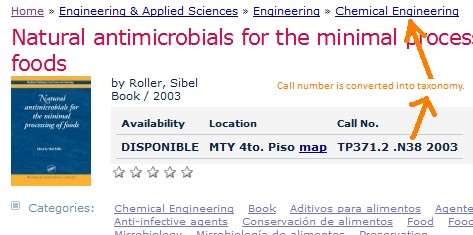
In our Drupal sites for our library and now in our Knowledge Hub we've been using LCC to catalog items and then using HILCC to produce a navigatable architecture in our Drupal sites.


This functionality is now available to the public at large as a Drupal module, which you can download here:

http://drupal.org/project/hilcc

HILCC is a hierarchic classification scheme developed originally at Columbia University Libraries, designed to offer library catalogs a way to easily cluster similar-subject items for navigation. HILCC is licensed under a Creative Commons BY-NC license.

For now it's only available for Drupal 5, but a D6 version is in the works.

Thursday, March 5, 2009

LOC (re-)releasing Subject Headings and more

Karen coyle mentioned LC is bringing back subject headings and other information (some originally available in the now-defunct lcsh.info).

More info is available in http://id.loc.gov/

What this means, is that at last some of LC's controlled vocabularies will be available to build the semantic web.

Wednesday, February 11, 2009

Wednesday, January 28, 2009

Auto-tag your content with Calais for Drupal

This is rebooting my interest in automated classification. =)

Check out the Calais Drupal module, based on the Calais service from Thomson-Reuters.
The Calais modules for Drupal (found at http://drupal.org/project/opencalais) are feature-rich, highly intuitive and designed to make it easy for Drupal users to automatically metatag their content, generating rich Semantic metadata that can be shared via a simple key and integrated into the larger content universe.


The screencast shows what an implementation would look like. I'm ready to use Drupal's RSS aggregator or FeedAPI module to pull in some content and see how Calais auto-tagging would work.

Of course, now I want to see what Calais does to library items imported into Drupal, see how Drupal would expose RDF and other stuff!