Friday, November 14, 2008

Drupal 6 version of Millennium Module available for testing

I just created and released a new version (2.0-dev) of the Millennium Integration module for Drupal. The earlier version worked with Drupal 5 and required the Biblio module. This new version is for Drupal 6, and removes the requirement for the Biblio module.

The module currently outputs bibliographic in a themeable table (meaning that with a little PHP, you can completely change the layout). For the final 2.0 version I plan to include other import and/or presentation options, like putting the fields into CCK or import into the Biblio module (when that module is available).


I still insist trying to integrate with Biblio because it already does a lot of cool things like provide a bibliographic citation (APA) view, provide CoINs (embedded machine-readable metadata in pages), export to bibliographic management software and more. For now, releasing this version will (I hope) kickstart a new round of testing by libraries who want to try out options to make their catalog better.

To get more information, download and installation instructions, go to the project page: http://drupal.org/project/millennium

Tuesday, October 14, 2008

The ugly, ugly results from my Vista voice recognition test

I tried to make Vista transcribe a presenter's speech during her presentation into Word using Vista's Voice Recognition, which I have barely used. I knew it would turn out ugly.


What?

Thursday, September 25, 2008

SOPAC 2 released

John Blyberg released www.thesocialopac.net, a site that hosts downloads, instructions and forums for SOPAC2, the "social opac" platform that powers Darien Library, and runs on Drupal. It uses Sphinx for fast searching.

The Social OPACâ„¢

At first glance, the install procedure seems a bit lengthy! I guess I could come up with smaller startup instructions for a similar setup using the Millennium module and "just" Drupal, but then I would still have to narrate how to install all of the modules to really get some great functionality. I guess I'll just have to install it myself and see how it works.

Congratulations, John!

Wednesday, September 24, 2008

What I found in my switch to Mac, Drupal-wise

The last 7 days I've *had* to work on a MacBook pro, due to me switching jobs, and this being the only available laptop.

It's a beautiful machine, but making the switch was... well... interesting =)

Here are some of the things I found about switching to a Mac from Windows AND working with Drupal:
  • If you want to run apache/mysql in a Mac, best to install MAMP. It's dead simple! Large download though (then I found about universal binaries and architecture-specific dowloads--d'oh!)
  • For text editing, TextMate is great, but it's not free. It can sort-of upload stuff via FTP with an added bundle, but you have to type in a lot of information manually for each file. I found out you can use the Fetch FTP client (commercial, but free to educational institutions and other uses) to automatically FTP your files whenever you change them with any text editor (you have to download them via Fetch first!) So, now instead of TextMate I could get by with other editors like Smultron.
  • For screengrabbing, get Skitch! You'll love it.
  • Although the Mac does run under UNIX, it does not have CVS support by default. So you'll have to install a client of some sort. I haven't gotten this far, though (I use CVS from our test server); as I understand it, you can get it from the Development tools provided by Apple (but it's a huge download)--more about that here.

Friday, September 5, 2008

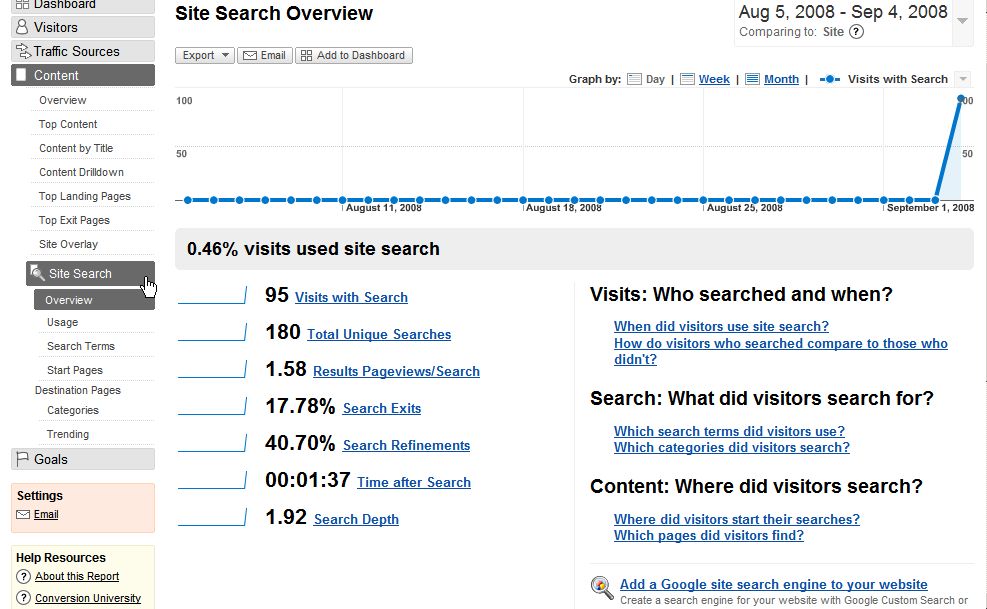
Using Google Analytics to track searches in Drupal

Updated: Added some PHP code to complete the example

Google Analytics needs you to specify part of a query string in order for you to get specialized "Site Search" reports. However in Drupal you might have nice Clean URLs like this:
http://example.com/search/bananas

instead of what GA wants, something like
http://example.com/search?query=bananas


You can still get Site Search reports for searches using Clean URLs, using the Google Analytics API.

You just need to:

  • Use the "new" GA handling code.
  • Add code like this at the end of your page; I recommend putting it inside a Block (be sure to mark the Input Format to be "PHP code"):

    <?php
    if (arg(0) == 'apachesolr_search' || arg(0) == 'search') {
    $keys = search_get_keys();
    ?>
    <script type="text/javascript">
    pageTracker._trackPageview('/site_search?query=<?php echo $keys; ?>');
    </script>
    <?php
    }
    ?>

You then tell your GA report's settings to activate Site Search reporting and to look for "query" as the search argument.

After a day of logging, your GA reports will include the report. See a site searching report sample.

Tuesday, September 2, 2008

Video Tour of OPAC Discovery Layer Tools

The Disruptive Library Technology Jester posted (a while back!) the video for this presentation which demos OPACs from different libraries which are either: OPAC enhancements, OPAC wrappers or OPAC replacements.

It's a good watch.

http://dltj.org/article/discovery-layer-video-tour/

To me, some lessons are:
  • for user tags to be useful in an OPAC, you need critical mass, or seed the catalog with tags from an external source (LibraryThing?)
  • while there are a lot of similarities in the way the interfaces work, there are some things that *maybe* should be standardized; like the location of facets, labelling, etc. A research opportunity.
  • If I had to pick an [open source] discovery layer from those presented, I'd have to say Scriblio; it just seems solid, everything looks dead simple and keeps you clicking. One thing I'd change is the facet layout, as they seem rather "mashed together"--whitespace to the rescue?

Monday, September 1, 2008

Drupal + SOPAC + Community power Darien Library's new site and OPAC

Step by Darien Library's website, where you can see their new catalog powered by Drupal and SOPAC2, created by John Blyberg. John created the Ann Arbor District Library site, which uses an III system for its ILS, and was--according to Richard Wallis--"the poster child of Library 2.0" websites.

You can find out more about SOPAC:

From the interview, it seems that the code for SOPAC will be available in a week or two, and John stated that it will be GPL-licensed.

Congratulations!

Drupal in the Cloud presentation from Drupalcon 2008

This presentation is not only interesting for Drupal developers; it's a great starting point for learning about what cloud computing is, the difference between platform-as-service and infrastructure-as-service, a list of companies offering these services, what some dangers and benefits are... and more. They detail what it takes to put Drupal into the Amazon EC2 service, and show a video of what a Firefox-based cloud administration tool looks like.

Recommended.

http://www.archive.org/details/drupal_in_the_cloud

More Drupalcon videos here

P.S.: The sound isn't perfect, though =)

Tuesday, August 26, 2008

McGill U Library scanning books with Kirtas


Via Campus Technology:

McGill University Library in Montreal will be using a Kirtas Technologies APT BookScan 2400RA to digitize its collections. The company said that the 2400RA is capable of acquiring page images at the rate of 2,400 pages per hour. The library will be working with Ristech, a Canadian reseller, to implement the digitization solution.


The post says they will make scanned books available via print-on-demand services.

Monday, August 25, 2008

Drupal Rocks Libraries slideshow

I couldn't really track down the real author(s) of this slideshow; Acquia and the Libraries group @ Drupal.org are mentioned, but I'm not sure who made this =)

Our library's homepage is in there =)


View in Blip.tv

Via Acquia's blog.